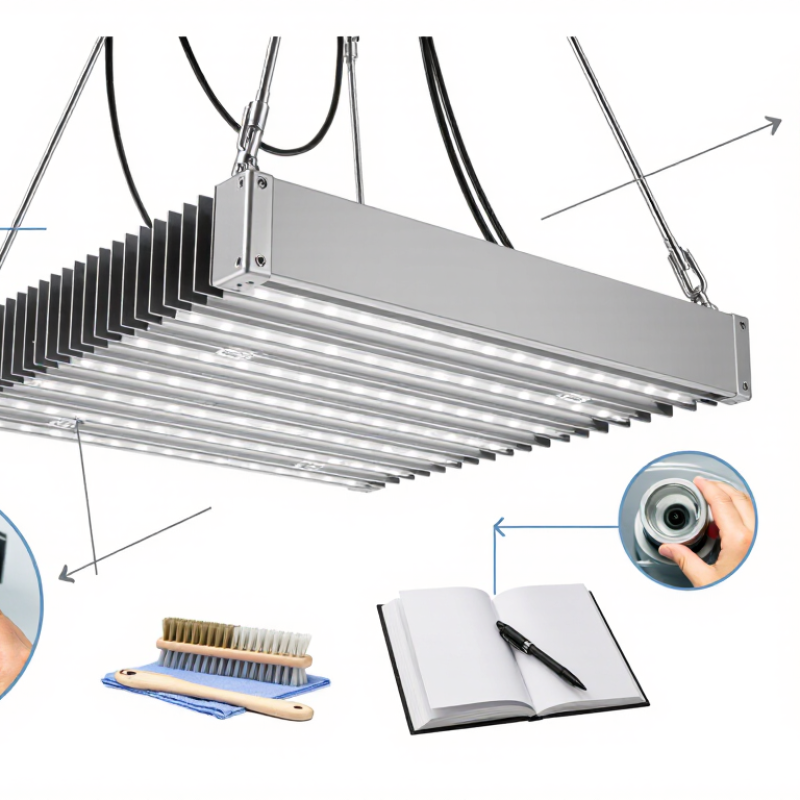
How to clean and maintain LED grow panels starts with a simple habit: switch off the fixture, let it cool, and inspect the lens, fins, cables, and hanging points. Dust forms a soft gray film. In humid grow rooms, residue can cling around vents and reduce airflow. Use a dry microfiber cloth or a soft brush first. If the manufacturer permits damp cleaning, apply a small amount of water to the cloth—not directly to the panel. Avoid abrasive pads and household sprays. A rushed wipe can leave streaks, or worse, push moisture into the housing.
Reliable maintenance protects both light output and fixture life. The U.S. Department of Energy’s LED lifetime guidance explains that operating conditions affect longevity; heat and poor thermal management can shorten service life. IES LM-80 testing also evaluates LED package lumen maintenance over thousands of operating hours. These figures describe test conditions, not a promise that every grow panel will perform identically. Check the manufacturer’s manual and warranty before cleaning.
Dr. Bruce Bugbee, a horticultural-lighting researcher, emphasizes measuring useful light at plant level rather than judging brightness by eye. Put plainly, and paraphrased rather than quoted: “Measure canopy light; don’t rely on appearance alone.” After cleaning, check the fixture’s output and look for uneven dimming, loose connectors, or unusual heat. Keep a simple maintenance log. It may feel fussy. Still, clean panels and measured light make troubleshooting easier—and occasionally, the reading may surprise you.
Before cleaning a grow panel, check its IEC 60529 IP rating on the label or in the manual. The first digit describes protection from solid objects and dust; the second describes protection from water. An IP rating is not a general promise that a fixture can be washed. A low or missing rating calls for extra caution.
Power the panel off and unplug it before maintenance. Keep water away from connectors, drivers, and vents unless the manufacturer specifically permits exposure. An IPX4 rating indicates testing against splashing water, not soaking or pressure washing. IP65 offers dust-tight protection and resistance to water jets under defined test conditions, but that still does not automatically make direct spraying a sensible cleaning method. Use a dry microfiber cloth or soft brush for dust. For stubborn marks, slightly dampen the cloth, not the fixture, and dry the surface promptly. Never immerse it. Small detail, big difference.
I would not rely on the rating alone; seals can wear, and installation may expose openings. That assumption can be wrong. If the label is unclear, choose the gentlest method and ask the manufacturer before using liquids.
| Inspection or Task | What to Verify | Recommended Care | Important Caution |
|---|---|---|---|
| Find the IP rating | Check the fixture label, product documentation, and installation instructions for an IEC 60529 rating, such as IP20 or IP65. | Confirm the rating for the complete fixture and its installed configuration before selecting a cleaning method. | Do not assume an unmarked fixture is water-resistant. A rating may depend on covers, cable glands, connectors, or correct installation. |
| Understand the rating | The first digit describes protection against solid objects and dust; the second digit describes protection against water ingress. An “X” means that digit is not specified. | Use the full rating as one factor in choosing care practices, alongside the manufacturer’s instructions. | An IP rating is not a general cleaning approval and does not specify resistance to cleaning chemicals, corrosion, or every exposure condition. |
| IP20 or a rating with no water protection | IP20 provides protection against finger-sized solid objects but has no stated water protection. | With power isolated, remove loose dust using a dry, soft, lint-free cloth or a soft brush. | Do not spray, rinse, or wipe with a wet cloth. Keep liquids away from vents, seams, switches, and electrical connections. |
| IP44 | The “4” solid-object digit indicates protection against objects 1 mm and larger; the “4” water digit indicates protection against splashing water from any direction under test conditions. | Prefer dry cleaning. Use a slightly damp cloth only if the manufacturer permits it, and ensure the fixture is disconnected and fully dry before reuse. | Protection against splashes does not mean the fixture can be sprayed, rinsed, or cleaned while powered. |
| IP65 | The “6” indicates dust-tight protection; the “5” indicates protection against water jets under specified test conditions. | Follow the fixture’s care instructions. Do not use water jets for routine cleaning unless the manufacturer explicitly allows that method for the installed fixture. | Water-jet protection does not make connectors, opened enclosures, or incorrectly fitted seals safe to wash. |
| IP67 | The “7” indicates protection against temporary immersion under defined test conditions, generally up to 1 m for 30 minutes. | Use the rating only as an enclosure-protection reference; clean the panel by the method specified by its manufacturer. | Do not immerse the fixture for cleaning. The test rating does not establish suitability for prolonged immersion or repeated washing. |
| Before cleaning | Check the power supply, controller, connectors, and any manufacturer-required cooldown period. | Switch off and disconnect power, allow hot components to cool, and work with dry hands in a dry area. | Never clean an energized fixture or open its electrical enclosure unless qualified and authorized to do so. |
| Dust on the lens or heat sink | Look for dust buildup on optical surfaces, cooling fins, and ventilation openings. | Use a clean, soft cloth or soft brush with light pressure. Keep vents clear without pushing debris into the enclosure. | Avoid abrasive pads, sharp tools, and high-pressure compressed air that could damage optics, coatings, seals, or components. |
| Stains or residue | Check the manual for approved cleaning agents and compatible lens materials. | If permitted, apply a small amount of approved cleaner to a cloth rather than spraying the fixture; wipe gently and dry completely. | Avoid solvents, bleach, ammonia-based cleaners, and unapproved detergents, which may damage plastics, coatings, gaskets, or labels. |
| After cleaning | Inspect the housing, lens, cable entries, seals, and connectors for cracks, looseness, moisture, or damage. | Reconnect power only when the fixture is dry, intact, and correctly reassembled according to its instructions. | If moisture has entered the fixture or a seal is damaged, keep it disconnected and contact a qualified service provider. |
| Routine maintenance | Record cleaning dates and note changes in light output, unusual heat, flickering, or visible damage. | Set an inspection schedule based on dust levels, operating conditions, and the manufacturer’s guidance. | Do not treat a suggested schedule as a substitute for the product’s maintenance instructions or electrical safety requirements. |
Note: IEC 60529 IP ratings describe enclosure protection under specified test conditions. Always follow the LED grow panel manufacturer’s instructions and local electrical safety requirements; when the rating or cleaning method is unclear, use dry cleaning and consult a qualified professional.
Switch it off, unplug it, and let it cool fully. A timer or dimmer may not disconnect power. No shortcuts.
Use a soft, dry microfiber cloth or brush. A low-suction vacuum can help with vents. Keep it away from wiring.
Brush along the fins so dust does not get pushed deeper. Hold fan blades still while cleaning. Less pressure is safer.
Wipe visible dust with a clean, dry microfiber cloth and light strokes. Avoid paper towels, abrasive pads, and household cleaners. Stop if a mark remains.
No. Keep liquids away from drivers and connectors, and never spray the fixture directly. I may be overly cautious, but exposed connections deserve care.
Measure PPFD at canopy height with a quantum sensor. Record readings across a fixed grid, including the center and corners. Use µmol·m⁻²·s⁻¹.
Keep hanging height, dimmer setting, warm-up time, and sensor positions consistent. Small changes can shift readings.
Dust may be one cause, but mounting height or aging components may also matter. Compare readings with your baseline. Sensor placement and room reflections can skew results.
How to clean and maintain LED grow panels starts with checking the fixture’s IEC 60529 IP rating, which indicates how well it is protected against dust and moisture and helps determine suitable cleaning methods. Before any maintenance, disconnect the power and allow the panel to cool completely. Remove loose dust gently from heat sinks, fans, and optical surfaces with a soft brush or lint-free cloth; avoid abrasive tools and harsh cleaning methods that could damage components or coatings.
During routine checks, look for cracked or cloudy lenses, loose or damaged wiring, and signs of corrosion. Follow the manufacturer’s care instructions, especially for moisture exposure and cleaning products. To assess performance over time, measure PPFD in µmol·m⁻²·s⁻¹ at consistent positions and compare the readings with the original baseline. Regular, careful cleaning and inspection can help preserve light output, support reliable operation, and reveal problems before they affect performance.

 Enova Lighting